FM WhatsApp has a feature that allows you to change its icon. You can use this feature to disguise FM WhatsApp as another inconspicuous app, while also adding an app lock to fully protect your privacy.
Now, let’s get straight to the point and learn how to FM WhatsApp change icon.
How to Change FM WhatsApp Icon Directly Inside the App?
Method 1: Use FMMods Settings
This is the most common and recommended method for changing your FM WhatsApp icon:
- Open FM WhatsApp
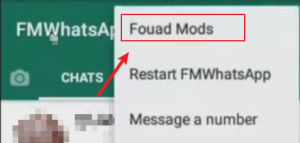
- Tap the Three-Dot Menu: Tap the three vertical dots in the top-right corner to access the menu.
- Select “FMMods” or “FM Mods”
- Go to Universal Settings: Universal Settings>Home Screen>App Icon (or Change App Icon)
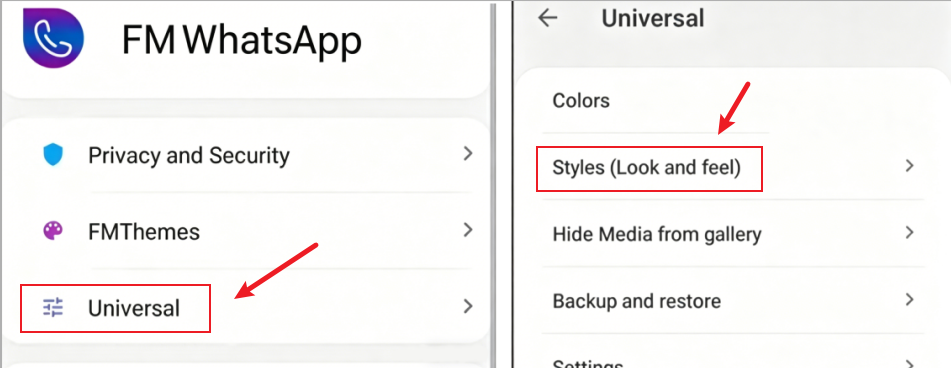
Some versions place this under:
- Settings > Themes
- Settings > Launcher Icon
- Browse the available icons
- Classic WhatsApp Icon
- Dark Icon
- Transparent Icon
- Minimal Logo
- Alternative FM Logos
- Select your preferred icon and tap “Apply.”
- Confirm and Restart: Some versions restart automatically. Others require closing and reopening the app.
Once done, your new icon should appear on your home screen.
Method 2: Change the FM WhatsApp Logo Through Themes
Many FM WhatsApp themes come with their own custom icons.
- Access the theme store by going to FMMods > FMThemes > Store.
- Browse downloadable themes. Themes include: Chat bubble redesign, New fonts, Full logo replacement, and Launcher icon modifications.
- Download and apply a theme that appeals to you.
- Check if the icon changed.
This method allows you to match the FM WhatsApp logo change with the FM WA theme, making it more visually appealing.
Method 3: Change FM WhatsApp Icon Using Android Launcher
If the previous methods didn’t work to change the FM WhatsApp icon, try this method. This approach allows you to change the icon for WhatsApp and its modified versions, even if they don’t normally support it.
- Install a custom launcher like Nova Launcher, Lawnchair, or Microsoft Launcher from the Google Play Store. Here we’ll use Nova Launcher as an example.
- Install Nova Launcher
- Long-press the FM WhatsApp icon
- Select “Edit”
- Tap the current icon to change it.
- Choose to change the icon: You can choose the icon that comes with Nova Launcher, or you can choose an icon from your image library, such as a picture of your cat.
- Save changes
This method is the most flexible, but it requires you to download another application.
How to Make FM WhatsApp Look Like Official WhatsApp?
You want FM WhatsApp’s extra features… without a visibly modified icon. This is very simple.
- Change the icon: To disguise yourself as the official WhatsApp, the most important thing is to look like the official app. Please change the icon to the official green WhatsApp icon.
- Match notification style: To avoid errors, you can also change the message notification style to the official style. You can find the official notification style in the customization settings.
- Use the default chat theme: If you don’t need the customization features of FM WhatsApp, then using the default chat theme will be more in line with the official WhatsApp.
Why FM WhatsApp Icon Change May Not Work?
If you’re having trouble changing the FM WhatsApp icon, here are some common reasons why it might fail and how to fix it.
- Your Launcher Cached the Old Icon
Android launchers sometimes store old icons.
Fix:
- Remove the FM WhatsApp shortcut from the home screen
- Re-add it from the app drawer
- Restart phone
- Your FM WhatsApp Version Does Not Include Icon Packs
In order to reduce application memory usage, some older versions will remove some features, so not all versions support icon changes.
You can update your FM WhatsApp APK by searching the FM WhatsApp official website.
- Permission or Theme Conflict
If you are using a third-party application to change the WhatsApp logo, you need to grant that application the necessary permissions. When you don’t allow permissions, app icons might not work correctly.
Please follow the app’s prompts to enable permissions in your phone’s settings.
- Icon reverts to default after updates
Sometimes, FM WhatsApp updates don’t properly cover older versions, and this can happen. You can try resetting the icon.
Why People Change FM WhatsApp Icons?
It’s not only about aesthetics, but there are practical reasons.
To achieve a cleaner home screen, some users change the FM WhatsApp icon. This helps maintain uniform icon colors for a minimalist Android look.
Some users choose FM WhatsApp for privacy reasons. The advanced privacy features of FM WhatsApp are a major reason for its popularity; these users value their privacy and want FM WhatsApp to be less conspicuous to protect the security of their chat history.
FAQ
Q: Why can’t I find the FM WhatsApp logo change option?
A: Your current version might not have this feature. Try updating to a version that supports themes and icons. You should also check the “Themes” section instead of “Universal Settings.”
Q: Can I hide FM WhatsApp by changing the logo?
A: You can set the icon to the background color to hide it, but this isn’t true app hiding; you might need other methods to achieve app hiding.
Q: Do I need to pay for the icons in FM WhatsApp?
A: No, the built-in icons of the FM WhatsApp free download app are all free.
Q: Will changing my icon affect FM WhatsApp’s functionality?
A: No, changing your icon is purely cosmetic and doesn’t impact any functional aspects of the application.
Q: Is changing the FM WhatsApp icon reversible?
A: Absolutely! You can always revert to the default icon or any previously used icon. Simply navigate back to the icon settings and select your preferred option.
Conclusion
Changing the FM WhatsApp icon isn’t difficult. Once you learn how, you can freely change the icon to your liking.
Besides changing the icon, FM WhatsApp offers many more customization features. If you’re interested, download FM WA and explore them yourself to create your most personalized design.