Many people use instant messaging apps every day, but sometimes they want better control over their privacy. One of the popular features of FM WhatsApp is “freeze last online time”. Even if you keep the app open and read messages, this feature will set your last online time to an earlier time. It gives you more freedom to use the app without having to frequently update your online status. For users who value quiet time or simply do not want others to track when they were last active, the FM WhatsApp freeze last seen function provides a simple way to maintain that privacy while still enjoying normal conversations and message access.
In this guide, we will explain what “Freeze Last Online Time” is, why people use it, and how to enable it in FM WhatsApp.
What Does “Freeze Last Seen” Mean?
In instant messaging apps, “Last Online Time” displays the time when a user last opened the app or was active. Normally, this time changes each time you check a message, open a chat, or reply to a message. Therefore, your contacts can easily see your recent online time.
FM WhatsApp offers a useful privacy option called “Freeze Last Online Time.” When it is turned on, your last seen timestamp stays fixed at one moment and will not update, even if you keep using the app. This means people will always see the same activity time instead of your real online status. For users looking for ways like freeze last seen on whatsapp iphone, this feature shows how modified versions of WhatsApp manage last seen visibility more flexibly.
For example, suppose your last online time is shown as 9:30 p.m. When the freeze option is enabled, even if you later open the app, read messages, or reply to messages, your contacts will still see 9:30 PM. The displayed time will remain unchanged until you turn off this feature.
This feature gives users more control over how their activity status is displayed to others. The status no longer displays the time you view the app, but remains constant.
Why Users Freeze Their Last Seen
Many people choose to freeze their last online time because it gives them greater control over how they use the app. Instant messaging apps have become a part of daily life, but not everyone wants their activity to be constantly visible. This feature helps users manage conversations in a more comfortable way.
More Private Personal Privacy
Some users prefer to protect the privacy of their online activity. If the last online time is constantly updated, others can easily notice who has the app open. After freezing the last online time, users can view messages or browse chat history without revealing the exact online time.
Reduced Pressure to Respond Immediately
In many conversations, people feel obligated to reply immediately once they see they’ve been online recently. Freezing the last-run time can eliminate this pressure. Users can read the message, think about how to reply, and then reply when they have time.
More Freedom to Use Group Chats
Large group chats generate a large number of messages in a short period. Some users open the app simply to check for updates or important information. After freezing their last online time, they can read group messages without having to show that they were recently online.
A Better Balance Between Messages and Daily Life
Not everyone wants to be online all the time. Freezing the last online time allows users to view messages when needed while maintaining their online status. This makes communication easier and more comfortable, reducing stress.
Steps to Freeze Last Seen on FM WhatsApp
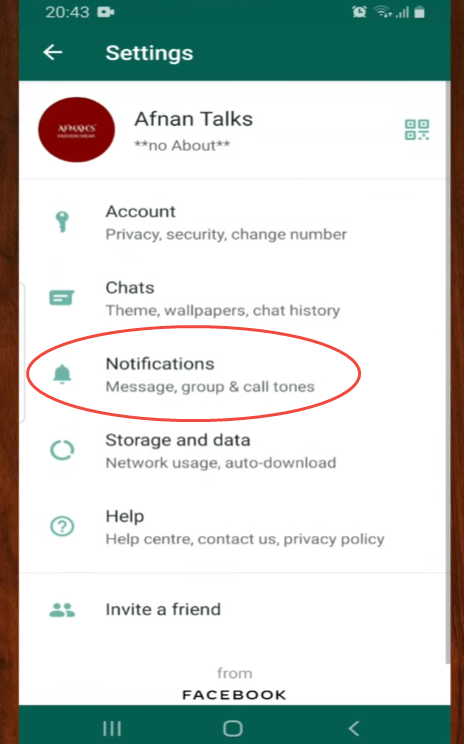
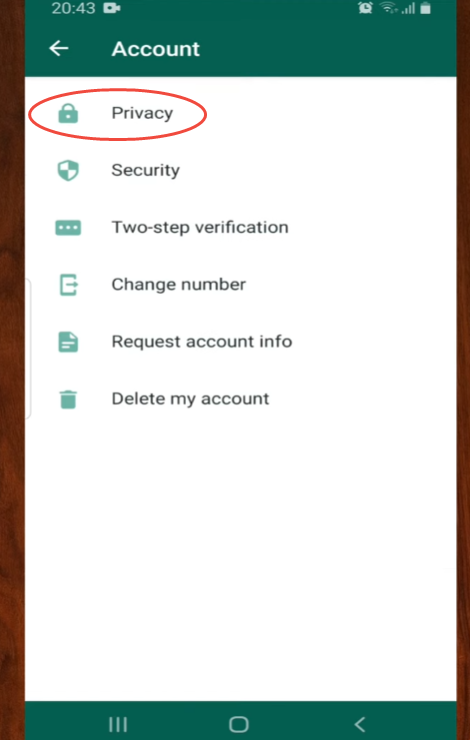
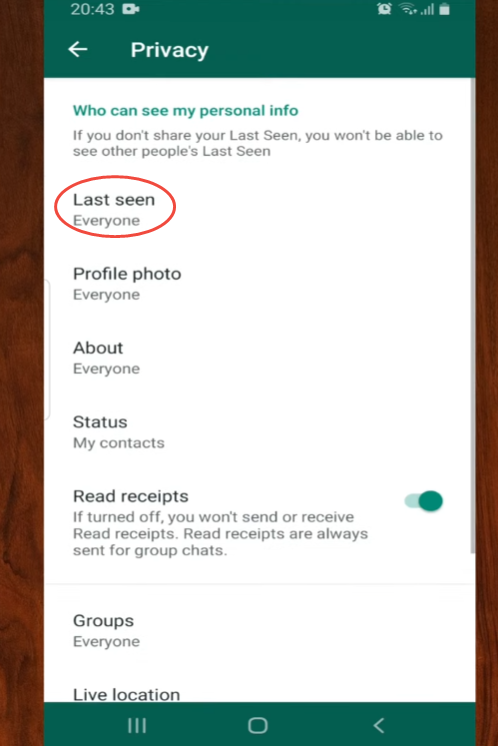
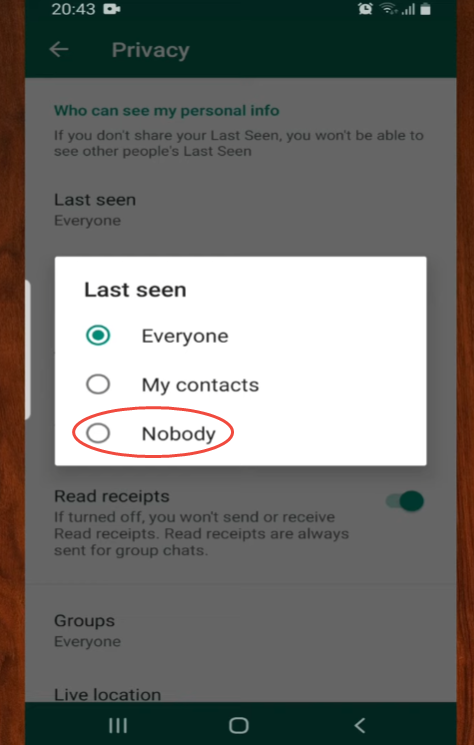
Turning on this feature is simple. Follow these steps:
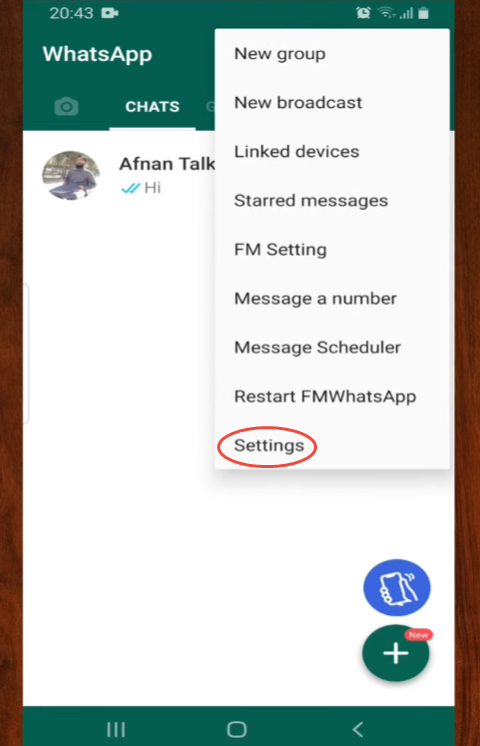
- Open FM WhatsAppon your phone.
- Tap the three-dot menuin the top corner.
- Go to FM Modsor Privacy Settings.
- Find the option called Freeze Last Seen.
- Tap the option to activate it.
After turning it on, your current last seen time will stay fixed.
Things to Know Before Using the Feature
While this feature is easy to use, it’s still helpful to understand how it works in everyday chat.
Before enabling the “Freeze Last Online Time” option in FM WhatsApp, it’s helpful to understand how it works in everyday use. Understanding these details can help you avoid confusion when chatting with friends or in groups.
Last Online Time will remain unchanged until you manually change it.
When this feature is enabled, the app will maintain the same Last Online Time. Even if you open the app multiple times throughout the day, the time will not update. It will always display the Last Online Time recorded when you enabled the feature.
You can still use the app normally.
Freezing the Last Online Time does not affect any normal operations within the app. You can open a chat, read messages, send a reply, share photos, or view status updates. All of these operations are as usual.
Contacts may notice the time hasn’t changed.
If someone frequently checks your profile, they may notice that your Last Online Time hasn’t changed for a long time. This is normal when this feature is enabled, but sometimes it may make users wonder why the time remains unchanged.
This feature can be turned off at any time.
This setting is not permanent. If you want the “Last Online Time” to update again, simply go back to your privacy settings and turn off the option. The app will then resume displaying your actual online time.
When to Turn Off Freeze Last Seen
While freezing the last online time is useful, sometimes turning this feature off can actually make conversations flow more smoothly. This feature is very flexible; you can enable or disable it depending on your needs.
When you want to show that you are active
Sometimes friends or colleagues may be waiting for a reply. If your last online time remains unchanged for a long period of time, others may assume that you are not using the app. Turning this feature off allows your activity to update normally, making communication clearer. If you want to try these updated privacy options and smoother status controls, you can look for the fm whatsapp new version download, which includes improved settings designed to make everyday chats feel more natural and responsive.
When you are having real-time conversations
In active chats, especially in discussions with friends or in groups, people usually reply quickly. Updating your last online time helps others know that you are still engaged in conversations and can respond at any time.
When you need to coordinate plans
If you’re discussing meeting times, travel plans, or work tasks, it can be helpful to let others know that you recently opened the app. Turning off the “Freeze Last Online Time” feature will make your event visible again, thus avoiding confusion.
When you want normal chat behavior again
Some users only freeze their last online time for a short period of time, such as during busy periods or when they need to rest quietly. Once the freeze ends and the feature is turned off, the app will resume normal behavior.
Freeze last seen works best as a temporary setting. You can turn it on when you want more privacy and turn it off when you prefer more open and active communication.
Tips for Managing Your Privacy in FM WhatsApp
Freezing your last seen is only one way to manage your activity. You can also improve your messaging experience by:
Checking your privacy settings regularly
Keeping your chats organized so you can reply more easily
Using status updates or messages to communicate when you are busy
Small settings like these can help you stay in control of your messaging routine.
When Is It Useful to Freeze Last Seen?
Freezing the last online time can be helpful in many everyday situations. Some people check messages early in the morning or late at night but prefer not to show that they are online. Others open WhatsApp several times a day and don’t want their activity to appear each time. In apps like fm found whatsapp, this feature helps users keep their messaging habits more private and relaxed.
This feature is also useful for users who receive a large number of messages. They don’t have to reply immediately after reading the message; they can reply at a more convenient time.
In group chats, freezing your last online time also makes the experience easier. You can read new messages, participate in conversations, and reply at any time without worrying about your last online time changing.