Ever created a stunning Instagram Story and wished you could share it seamlessly to your FM WhatsApp Status? You’re not alone. Many users struggle with how to share instagram story to whatsapp status without losing quality or formatting. In this guide, we’ll show you the simplest methods to get your instagram story on whatsapp in minutes, plus unlock exclusive FM WhatsApp features that make your status updates even more impressive. Whether you want to share your own stories or repost favorites, we’ve got you covered.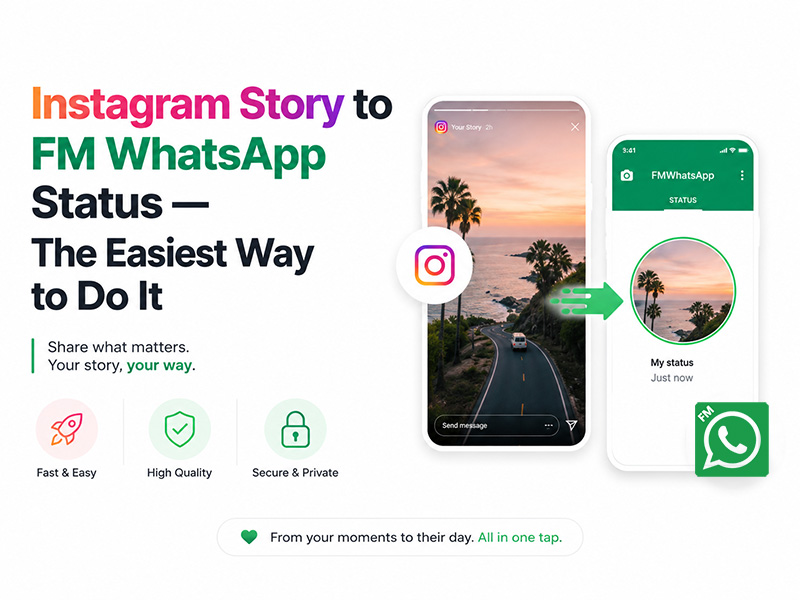
Why FM WhatsApp Makes Sharing Instagram Stories Better
Before we dive into the steps, let’s explore why FM WhatsApp is the ultimate tool for instagram story to whatsapp status sharing:
- No Quality Loss: FM WhatsApp preserves Instagram’s high-resolution stories
- Advanced Customization: Add extra text, stickers, filters, and even animated emojis
- Anti-Delete Status: Never miss a story. FM WhatsApp lets you view deleted statuses
- Dual Account Support: Share stories to both your official WhatsApp and FM WhatsApp accounts simultaneously
- Privacy Controls: Choose who sees your status with FM WhatsApp’s enhanced visibility settings
Method 1: Direct Sharing
The fastest way to get instagram story on FM version is using Instagram’s built-in sharing feature:
- Create/Publish Your Instagram Story: Add photos, videos, text, music, and stickers to craft your perfect story
- Open the Story: Tap your profile picture to view the published story
- Find the Share Button: Look for the paper airplane icon or three-dot menu
- Select “Send”: Choose this option from the sharing menu
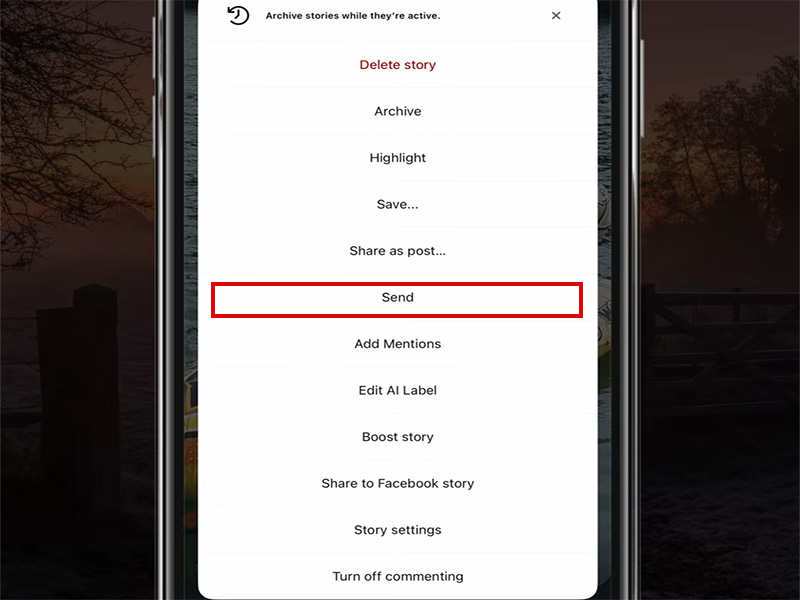
- Choose FM WhatsApp: When prompted to select an app, pick FM WhatsApp
- Select “My Status”: Tap this option in FM WhatsApp’s sharing interface
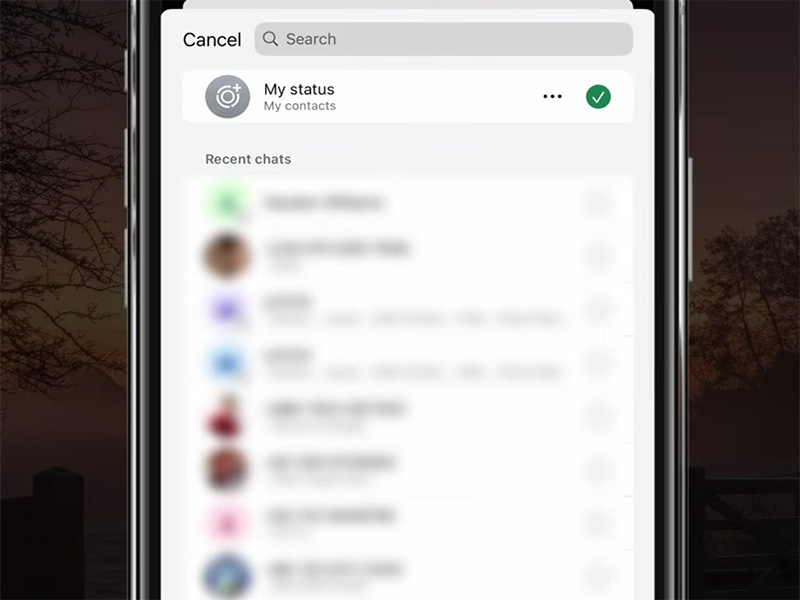
- Add Finishing Touches: Use FM WhatsApp’s tools to add extra text, stickers, or filters
- Tap “Send”: Your Instagram story is now live on your FM WhatsApp Status!
Pro Tip: This method works best for sharing your own stories. For others’ stories, use Method 2 or 3 below.
Method 2: Save & Upload
If you want full control over your instagram story to whatsapp status transfer, save the story to your device first:
Step 1: Save the Instagram Story to Your Gallery
- Open the Instagram Story you want to share
- Tap the downward arrow icon to save the story to your camera roll
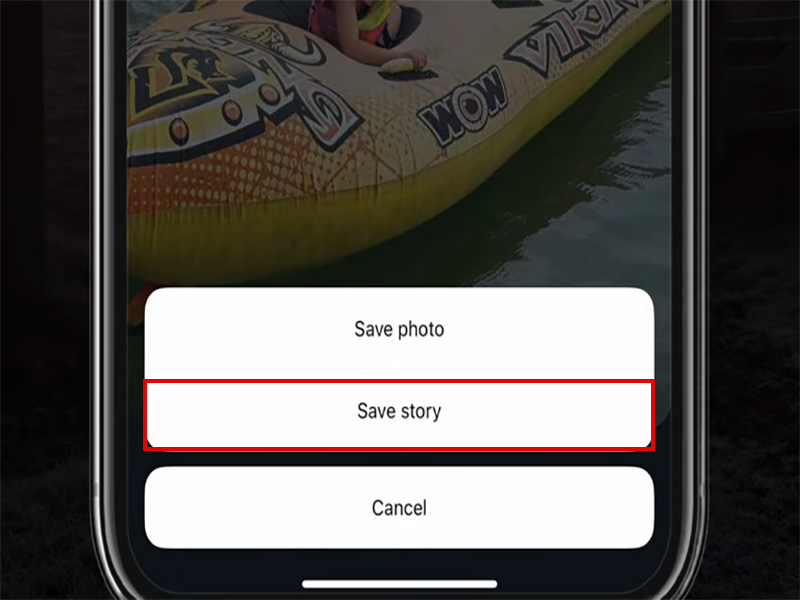
- For videos, wait for the download to complete
- Check your gallery to confirm the story is saved as a photo or video file
Step 2: Upload to FM WhatsApp Status
- Open FM WhatsApp latest version
- Tap the Status tab to access your status updates
- Tap the pencil icon or “My Status” to create a new status
- Select the saved Instagram story from your gallery
- Customize with FM WhatsApp Features:
- Add animated text
- Insert animated emojis
- Use anti-delete status protection
- Set Visibility: Choose who can see your status
- Tap “Send”: Your high-quality Instagram story is now on your FM WhatsApp Status!
This method is perfect for adding personal touches and ensuring your story looks exactly how you want it on FM WhatsApp.
Method 3: Link Sharing
Want to share someone else’s Instagram Story to your FM WhatsApp Status without saving it? Use this method:
- Open the Instagram Story: Navigate to the story you want to share
- Get the Story Link:
- Tap the three-dot menu
- Select “Copy Link”
- Open FM WhatsApp: Launch the app and go to the Status tab
- Create a New Status: Tap the pencil icon or “My Status”
- Paste the Link: Long-press the text field and select “Paste”
- Add Context: Write a caption explaining why you’re sharing the story
- Customize: Use FM WhatsApp’s tools to add stickers, emojis, or text highlights
- Tap “Send”: Your followers can now tap the link to view the original Instagram story
Note: Always respect copyright and only share stories from public accounts or with the creator’s permission.
FM WhatsApp Exclusive Tips for Instagram Story Statuses
Take your instagram story to whatsapp status game to the next level with these FM WhatsApp-only features:
- Animated Enhancements
- Add animated emojis to your Instagram story statuses. Learn how in our Animated Emoticons guide
- Use FM WhatsApp’s animation tools to make text and stickers move on top of your story
- Status Management
- Anti-Delete Status: View and save statuses that others have deleted
- Download Status: Save any status to your device with one tap
- Hide View Status: View others’statuses without them knowing you’ve seen them
- Privacy & Security
- As we explained in our guide How to Prevent FM WhatsApp from Being Banned, always use the FM WhatsApp latest version with built-in anti-ban protection when sharing stories
- Avoid sharing copyrighted content or spammy links to keep your account safe
- Use FM WhatsApp’s custom visibility settings to control who sees your shared Instagram stories
Final Thoughts
Sharing instagram story to whatsapp status has never been easier. Whether you prefer direct sharing, saving for full customization, or linking to others’ stories, FM WhatsApp offers the most flexible and feature-rich experience. With exclusive tools like animated emojis, anti-delete status, and enhanced privacy controls, your shared stories will stand out from the crowd.
Always use the FM WhatsApp latest version to access all these features and keep your account secure. Download it today and start sharing your favorite Instagram Stories to your FM WhatsApp Status in minutes!