Many people use FM WhatsApp because it offers additional chat and calling features. However, WhatsApp call connections may still experience common issues—the call may start out perfectly fine, but then suddenly drop out, or the video may stutter. Although these problems may seem to occur randomly, they are usually caused by several specific factors.
The following section will analyze the causes of these problems in detail and provide simple and direct solutions.

1. Weak or unstable internet connection
This is the most common reason for FM WhatsApp calls to be dropped, and even whatsapp crashed in rare cases when the app fails under unstable network conditions. Voice calls not only require high speed, but also a stable data stream; if the connection status fluctuates, the call cannot remain stable.
Main situations that cause this include:
- Weak Wi-Fi signal: If you are far from the router, the signal becomes unstable and packets get lost.
- Mobile data switching: Moving between different network areas can cause short disconnects during the call.
- Network congestion: When many people use the same network, speed may look fine but stability drops.
- Background network competition: Other devices or apps using the same Wi-Fi can reduce call quality.
Even a brief interruption in the connection can result in voice delays, sound distortion, or a sudden drop in the call. For voice calls, connection stability is more important than high network speed.
2. Background apps using too much data
Many call problems do not originate from the application itself, but are caused by other programs running in the background. Even if you don’t actively use certain apps, they may still run in the background and consume network traffic, thus affecting the call stability of FM WhatsApp.
For example, video apps may continuously buffer content, social apps may refresh feeds, and cloud services may sync photos or files. These activities will consume network resources simultaneously with your call. When too many tasks compete for the same network connection, the voice stream becomes weak and unstable.
This problem is particularly noticeable when using mobile data networks, especially when the signal is weak. The system must allocate limited bandwidth between the call and other background tasks, which often leads to interruptions, delays, or dropped calls.
We can use a busy road traffic scenario to illustrate this: the call is like one of the vehicles, while the background applications are like many other vehicles. When roads are congested, traffic flow slows down and the frequency of interruptions increases.
3. Phone performance limits
FM WhatsApp calls may become unstable if the phone is overloaded. This application requires stable system resources to maintain the transmission of voice data; when the phone is busy or overloaded, calls may be delayed, stuttered or dropped, and in some cases issues like whatsapp keep crashing can also appear when the system memory is under pressure.
Here are the main reasons this happens:
- Too many apps running at the same time
When multiple apps stay open in the background, they compete for RAM and CPU power. This reduces the resources available for calls, making the connection weaker. - Low available memory (RAM pressure)
If your phone has limited free memory, FM WhatsApp may not get enough space to process real-time voice data. This often leads to short interruptions or sudden call drops. - Heavy system load during multitasking
Actions like gaming, video editing, or running large apps while calling can overload the processor. The phone then struggles to keep the call stable. - Storage nearly full
When internal storage is close to full, the system slows down overall performance. This can indirectly affect call smoothness, especially when switching between apps or handling background tasks. - Device heating and performance throttling
If the phone gets too warm from long use, it may automatically reduce performance to cool down. This can make voice transmission unstable during calls.
When these limiting factors come together, even a normal network connection may not be enough to maintain call stability.
4. App cache and stored data issues
Over time, FM WhatsApp stores temporary files to help the app load faster and run more smoothly. These files are called cache and local data. When these files accumulate too much or become outdated, they can start to affect the stability of the call.
This problem usually doesn’t show up immediately, but rather accumulates slowly in the background; as a result, many users often don’t realize the problem until the call starts dropping or lagging.
Here are the main ways cache and stored data can affect calls:
- Old temporary files interfere with new call sessions
The app may try to use outdated data during a live call, which can cause sudden interruptions or delays in connection. - Excess cache takes up memory space
When too much storage is used by cached files, the app has less room to run smoothly. This can lead to lag during calls or even sudden disconnection. - Corrupted data slows down call processing
If some stored files become damaged over time, the app may struggle to maintain a stable voice connection. - Background syncing conflicts
Cached data may conflict with new network data, especially when the internet changes between Wi-Fi and mobile data.
In simple terms, when the app’s stored data becomes too heavy or outdated, it can interrupt how calls are processed in real time.
5. Outdated app version
Using older versions of FM WhatsApp may result in unstable calls. Developers typically release new versions to improve voice call performance, fix connectivity issues, and ensure the app is better compatible with newer Android system updates, which also helps WhatsApp fix various call-related bugs and stability problems. If you continue to use the outdated version, you may encounter problems such as frequent call interruptions, audio delays, or inability to establish a connection.
Older versions may be incompatible with the latest system updates or changes in the network environment, which may affect how the application processes voice data. Even if the app can still launch and send messages normally, its call function may not perform as smoothly as expected.
Upgrading to the new version helps improve overall stability, as the new version fixes known bugs and optimizes the voice call management mechanism. Many users have found that after updating to the newer version, unexpected disconnections have decreased and call quality has become more stable.
How to stabilize FM WhatsApp calls
If your FM WhatsApp calls are frequently dropped, there’s no need to try every possible solution one by one. Generally, optimizing both network conditions and phone status simultaneously yields the best results. Before making your next call, please follow these steps.
1. Use a stable internet connection
A stable connection is fundamental to ensuring smooth voice calls. If possible, connect to a strong and reliable Wi-Fi network. If using mobile data, please stay in an area with a stable signal. Avoid moving around in areas where Wi-Fi and mobile data frequently switch to each other to prevent call interruptions.
2. Close apps running in the background
Before starting a call, please close any applications that may consume network or device resources. Streaming apps, cloud backup services, large file downloads, and online games can reduce available bandwidth, potentially leading to unstable calls. Keeping only the essential apps running helps FM WhatsApp achieve better performance.
3. Restart your phone regularly
A simple reboot can improve call performance by clearing temporary files and stopping unnecessary background processes. If you find your phone running slowly or unresponsive, restarting it before making an important call can help you get a smoother experience.
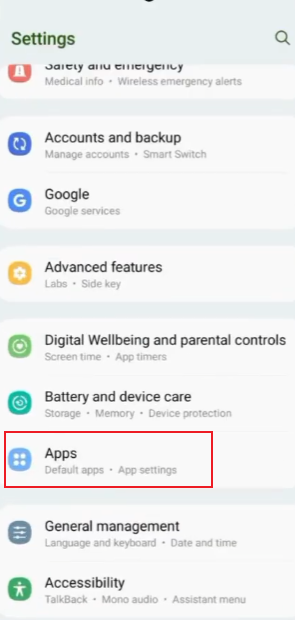
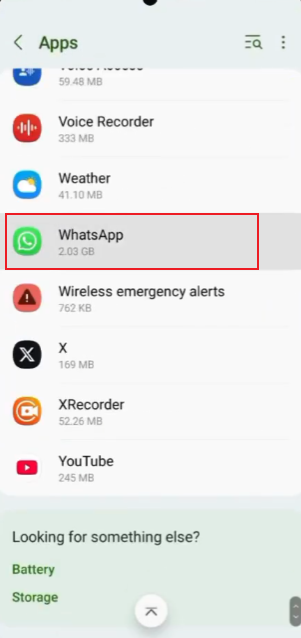
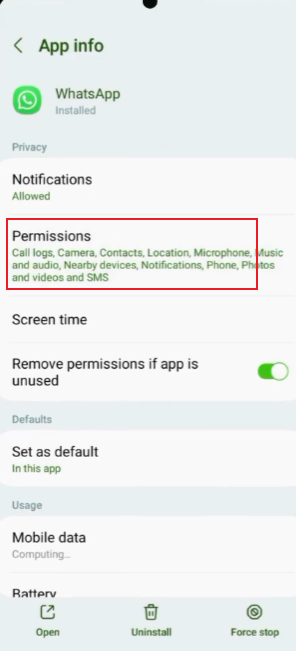
4. Clear FM WhatsApp cache
Temporary cache files are useful, but they accumulate over time. Clearing the app cache can remove unnecessary temporary data without affecting your chat history. Performing this action regularly can help the application run more smoothly and reduce unexpected call interruptions.
5. Keep enough free storage
Phones with very little available storage space tend to run slower. Please delete files you no longer need, or move photos and videos to other locations to free up space. Properly managing storage space helps the system respond faster during a call.
6. Update FM WhatsApp regularly
Using the latest version will allow you to benefit from performance improvements and bug fixes. Developers typically improve call quality and enhance overall stability in new versions, so it’s a good practice to regularly check for updates.
7. Stay in an area with a stronger signal
Even if your internet plan offers fast speeds, a weak signal can still affect call quality. When making long calls, please stay in a location with good signal and avoid moving around. Compared to simply pursuing high network speeds, a stable signal usually provides a more reliable call experience.
8. Test the connection before long calls
If you plan to have a longer call, please have a short test call first. This helps confirm that your network connection is stable and your equipment is functioning correctly. Taking a minute to check all settings beforehand can prevent interruptions during subsequent calls.
Final thought
Call drop-off issues in FM WhatsApp are usually caused by a combination of factors, including network connectivity, device load, and outdated application data. Once these issues are properly addressed, call quality during daily use will be significantly improved, becoming more stable and smooth.