Many users want to update their display name in WhatsApp FM. This name will appear in chat history, group lists, and sometimes in the contacts view. Changing a name is simple, but it’s helpful to understand where the new name will appear and what the impact will be. For example, if you are managing conversations while planning a switch like WhatsApp chats android to iPhone, keeping a clear and recognizable display name can make it easier for others to identify you across devices and avoid confusion during the transition.
In this guide, you will learn how to change your name step by step, as well as some tips for better managing your profile.
What Is the “Name” in FM WhatsApp?
In FM WhatsApp, “Name” refers to your display name, which appears on your profile page and may be visible to others in certain situations; it is different from the name saved in your phone’s contacts. If you’re wondering how to change FM WhatsApp name to WhatsApp, the process is simple and can be done directly within the app’s profile settings, allowing you to update how others see you without affecting their saved contact names.
This name is mainly used when:
- Someone receives a message from you, but has not saved your number
- You send messages in group chats
- Your profile is viewed directly
For example, if the other party has not saved your number, they will see the name you set in WhatsApp FM, not the contact name. In group chats, your display name can also help others identify you, especially if they are not familiar with your phone number.
It’s important to note that your display name does not override your contact name. If the other party has saved your number, they will usually see the name they set for you in their contacts, not the name you have in WhatsApp FM.
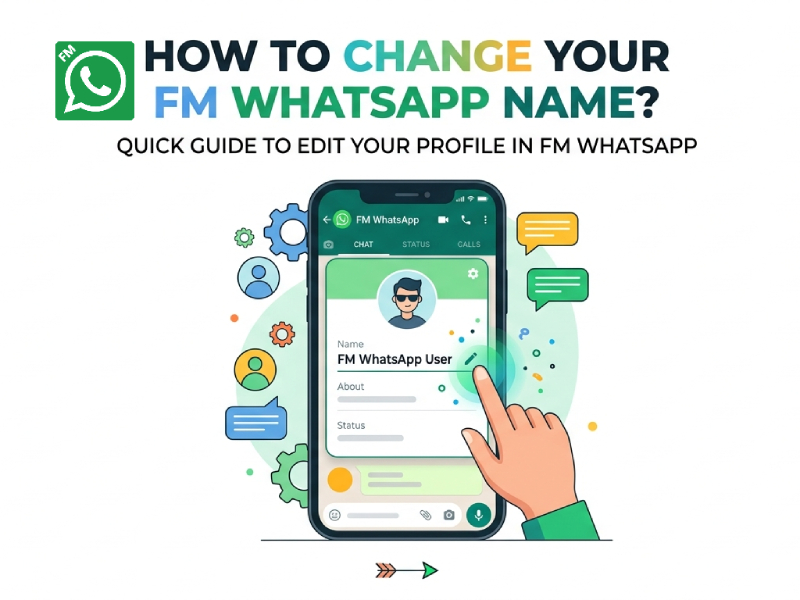
Steps to Change Your Name
Changing your name in FM WhatsApp only takes a minute, but it helps to follow each step carefully to make sure the update is saved.
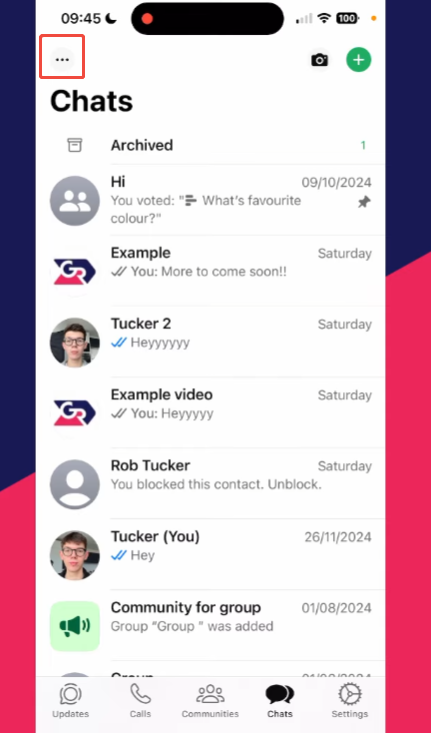
- Open FM WhatsApp
- Tap the menu icon
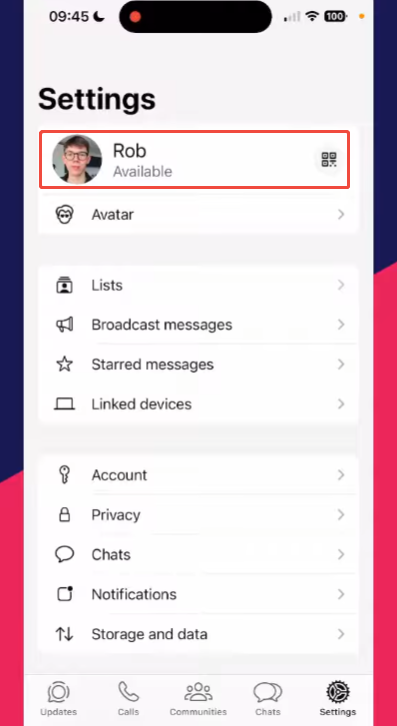
- Go to Settings
- Tap your profile section at the top
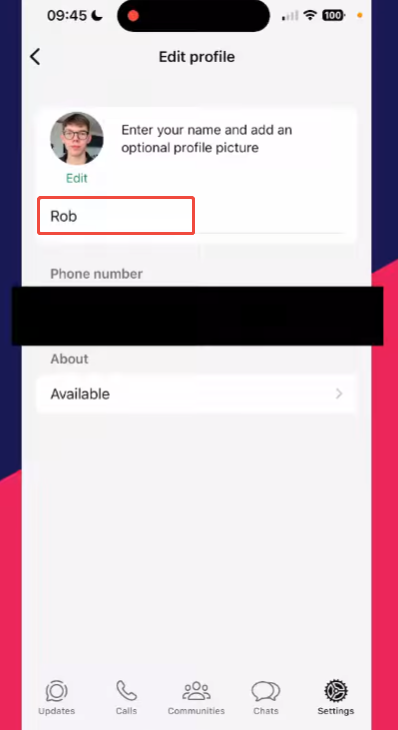
- Tap the Namefield
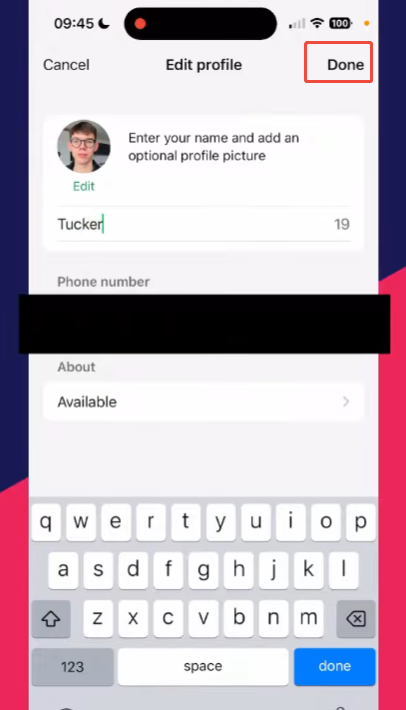
- Delete the old name and enter your new one
- Tap Save or the checkmark icon
After saving, your new name should appear right away in your profile.
If you don’t see the change, try these quick checks:
- Close the app and open it again
- Make sure your internet connection is active
- Go back to your profile to confirm the new name is saved
You can also take this moment to update other profile details:
- Profile photo: Tap your picture to change or remove it
- About section: Add a short line to describe yourself or your mood
Doing all updates together keeps your profile clean and consistent.
What Happens After You Change Your Name?
After updating your name in FM WhatsApp, the change usually takes effect immediately within the app. If you recently completed an fm whatsapp download and set up your profile, your new name will appear in places that display your profile, such as chat lists and group conversations.
Here is what you can expect:
- New chats will show the updated name
When you start a new conversation, people who have not saved your number will see your new name. - Group chats update quickly
In most cases, your new name will appear in group member lists and messages without delay. - Saved contacts may still see a different name
If someone has saved your number on their phone, they may still see the name they chose for you instead of your profile name. - Previous messages do not change
Your old messages will not update with the new name. The change only applies going forward. - Sync may take a short time in some cases
If the app or network is slow, it may take a few minutes before the new name appears everywhere.
Tips for Choosing a Good Name
Choosing a good name on WhatsApp FM may seem simple, but it can affect how others perceive and remember you in chats and groups. A clear and appropriate name can make communication smoother.
- Keep it short and easy to read
A simple name is easier for others to recognize quickly, especially in busy group chats. - Use a familiar name
Try to use a name that your friends or contacts already know. This avoids confusion. - Avoid too many symbols
A few emojis can add style, but too many symbols or special characters can make your name hard to read. - Stay consistent
If you often chat with the same people, keeping a stable name helps them identify you faster. - Match your style or mood
You can choose a casual name, a nickname, or something fun. Just make sure it still feels natural. - Think about group chats
In large groups, a clear name helps others find you quickly when replying or tagging. - Avoid very long names
Long names may get cut off on some screens, making them less useful.
Taking a moment to choose a simple and clear name can improve how others interact with you and make your chats more comfortable.
Can You Change Your Name Anytime?
Yes, you can change your name at any time in FM WhatsApp. There is no limit to the number of changes, and the entire process takes only a few seconds.
But it’s best to avoid changing the name too frequently. If you make multiple changes in a short period of time, other people in the chat or group may get confused and not be able to recognize you immediately, especially when using fmwhatsapp latest version of fmwhatsapp, where customization options are more flexible. This is especially evident in large group chats where user activity is high.
To maintain clarity, we recommend choosing a name that you can use for a long time. Afterwards, you can make changes as needed, such as when you want to change the style or make some minor modifications.
While you can change your name at any time, using a stable and easily recognizable name will make communication smoother.
Difference Between Name and About
In FM WhatsApp, Name and About are two different parts of your profile, and they serve different purposes.
- Name: This is your primary display name. It will appear at the top of your profile and often in group chats, especially in front of people who haven’t saved your number. This helps others recognize you quickly. Therefore, it’s best to keep your name clear and easy to read.
- About: This is a short text below your name, similar to a brief status message. You can use it to share your feelings, short messages, or simple status updates such as “busy,” “working,” or “online.” It is not used for identity recognition, but rather focuses more on self-expression.
There are also a few practical differences:
- Length: The name can be longer, while the About section is usually short.
- Purpose: Name is for identity, About is for a personal message.
- Visibility: Name is more noticeable, About is smaller and less prominent.
Some users like to update their About often to reflect what they are doing, while keeping their name the same. This keeps their profile fresh without confusing others.
Final Thoughts
Changing your name in FM WhatsApp is quick and easy. It can help you control how others see you in chats and groups. You can update your profile and keep it fresh in just a few steps.
If you frequently use FM WhatsApp, keeping your name clear and consistent can improve your overall chat experience.