WhatsApp allows users to customize many parts of their messaging experience, including chat wallpapers. A common question is whether changing a WhatsApp background can affect everyone in a conversation. If you have ever wanted to set a custom wallpaper for a group chat or personal conversation and have all participants see the same background, this guide explains how WhatsApp handles chat wallpapers and what options are available. In reality, a whatsapp background wallpaper is a personal setting that only changes the appearance of chats on your own device, meaning other participants will continue to see their own selected wallpapers unless they manually choose the same one.

Understanding WhatsApp Chat Backgrounds
WhatsApp chat backgrounds, also known as wallpapers, are the images or colors displayed behind your messages in a conversation. They play an important role in personalizing the app and making chats feel more visually appealing. Many users choose a whatsapp wallpaper for chat to match their style, creating a more enjoyable messaging experience. While wallpapers do not affect how messages are sent or received, they can change the overall look and feel of a conversation.
WhatsApp offers several wallpaper options to suit different preferences. Users can choose from built-in wallpaper collections, solid color backgrounds, or personal photos stored on their devices. Some people prefer simple and clean designs that make text easier to read, while others enjoy using travel photos, family pictures, or favorite artwork to make chats more personal.
Another useful feature is the ability to set different wallpapers for different conversations. For example, a user might select a professional-looking background for work-related chats while using a more colorful wallpaper for conversations with friends or family. This can help distinguish chats at a glance and create a more organized messaging experience.
In addition, WhatsApp supports separate wallpaper settings for light mode and dark mode. This allows users to maintain comfortable visibility throughout the day while keeping the appearance of the app consistent with their device settings. Regardless of which wallpaper is chosen, the customization remains personal and only affects the way chats appear on the user’s own device.
Why WhatsApp Uses Personal Wallpapers
There are several reasons why WhatsApp keeps the wallpaper settings individual.
1. Personal Preferences
Not everyone likes the same design style. Some users prefer colorful images, while others prefer simple backgrounds.
By keeping wallpaper settings personal, WhatsApp allows each user to create a comfortable viewing experience.
2. Better Readability
A wallpaper that looks good on one device may not be ideal on another.
Different screen sizes, brightness settings, and themes can affect readability. Personal control helps users choose backgrounds that make messages easier to read.
3. Privacy and Customization
Many users enjoy using personal photos as wallpapers. These images may have special meaning or simply match their preferred style.
Keeping wallpapers local to each device allows users to customize chats freely without affecting anyone else.
Why Doesn’t the Wallpaper Change for Everyone
WhatsApp treats wallpapers as personal display settings rather than chat settings.
Think of wallpapers like:
- Font size
- Notification sounds
- Chat themes
- Display preferences
These settings are stored locally on each user’s device. This allows everyone to customize their messaging experience without affecting other participants.
How to Change Your WhatsApp Chat Background
If you want to customize your own wallpaper, the process is straightforward.
On Android
- Open WhatsApp.
- Open the chat you want to customize.
- Tap the three-dot menu.
- Select Wallpaper.
- Choose a wallpaper category.
- Preview the wallpaper.
- Tap Set Wallpaper.
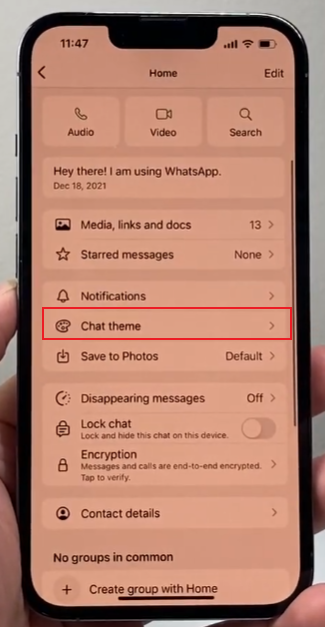
On iPhone
- Open WhatsApp.
- Enter the desired chat.
- Tap the contact or group name.
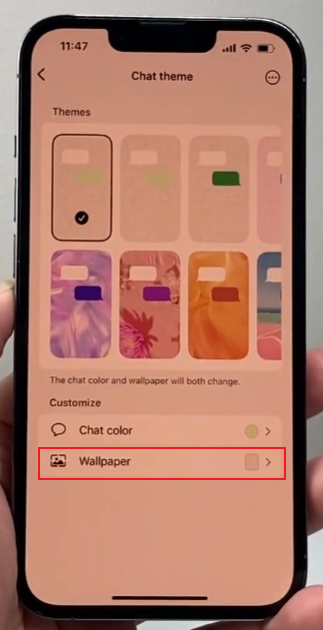
- Select Wallpaper & Sound.
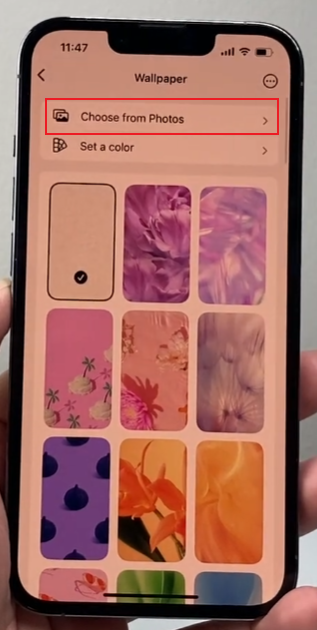
- Choose a new wallpaper.
- Save your selection.
The wallpaper will immediately appear in that chat on your device.
Can Group Admins Set a Shared Background
No, WhatsApp group administrators cannot set a shared background or wallpaper for all members of a group. While admins have special permissions that help them manage conversations and participants, visual settings remain under the control of each individual user.
Group admins can typically:
- Add or remove members
- Approve join requests
- Change the group name and description
- Update the group photo
- Adjust messaging permissions
- Assign or remove other admins
Wallpapers are considered personal display preferences rather than group settings. This means that any wallpaper chosen by an admin will only appear on the admin’s own device.
Some groups that want a more unified appearance use a simple alternative. An admin can share a wallpaper image in the chat and encourage members to download and apply it manually. This method works especially well when using a WhatsApp wallpaper with a status design that matches the theme of the group. It is often used for special occasions such as birthdays, school events, travel groups, holiday celebrations, or team projects, helping everyone create a more consistent visual experience.
At present, WhatsApp does not provide a built-in option for administrators to automatically apply wallpapers, themes, or chat backgrounds to every member of a group. Each participant remains free to customize the chat appearance according to their own preferences.
Can Chat Themes Be Shared
Some users confuse wallpapers with themes.
A theme usually includes:
- Background image
- Chat bubble colors
- Interface colors
- Visual style elements
WhatsApp currently focuses mainly on personal customization. Any theme or wallpaper changes remain tied to the individual user account and device.
As a result, there is no built-in feature that automatically applies the same visual design to everyone in a conversation.
Creative Ways to Use Matching Wallpapers
Although WhatsApp cannot synchronize wallpapers across participants, friends and family sometimes use a simple workaround.
Share the Same Image
One person can send a wallpaper image to the group.
Then each member can:
- Download the image.
- Open wallpaper settings.
- Select the image manually.
- Apply it to the chat.
This creates a matching look for everyone who chooses to participate.
Event-Themed Wallpapers
Groups often use matching wallpapers for:
- Birthdays
- Weddings
- Family reunions
- School projects
While the change is not automatic, it can help create a shared visual theme.
Can Different Chats Have Different Wallpapers
Yes. WhatsApp allows users to assign different wallpapers to individual chats, making conversations easier to organize and recognize. Instead of using one background across every conversation, you can personalize each chat based on the person, group, or purpose of the conversation.
For example:
- Family chat → Family photo
- Work chat → Simple gray background
- Friends group → Travel image
- Personal chat → Favorite picture
This feature is especially useful for people who participate in many conversations every day. A unique wallpaper can help you quickly identify a chat before reading the contact name, reducing the chances of sending a message to the wrong conversation.
Different wallpapers can also help separate different parts of your life. Some users prefer calm and simple backgrounds for work-related discussions, while choosing colorful or fun images for chats with friends and family. Group chats, project discussions, and community conversations can each have their own visual style.
Whether you prefer photos, landscapes, abstract art, or solid colors, using different wallpapers for different chats can make WhatsApp feel more organized, personal, and enjoyable to use.
Will WhatsApp Add Shared Wallpapers in the Future?
WhatsApp regularly introduces new customization features. While users often request shared themes and synchronized chat designs, there is currently no official feature that allows one wallpaper setting to apply to all participants in a conversation. Users can still change WhatsApp background settings on their own devices to personalize chats, but these changes remain visible only to the person who applies them and do not affect how the conversation appears for others.
Future updates may bring additional customization options, but at the moment, wallpapers remain personal settings.
Conclusion
If you are wondering whether you can change the WhatsApp background for everyone in a chat, the answer is no. WhatsApp wallpapers are individual settings that only affect the user who applies them. Whether you are chatting with one person or managing a large group, each participant controls their own wallpaper.
The good news is that WhatsApp offers plenty of customization options, allowing every user to create a chat environment that matches their personal style. If a group wants a shared look, members can manually use the same wallpaper image, but the change must be made separately on each device.