Losing important WhatsApp messages can be frustrating. Perhaps you accidentally deleted the chat history, changed your phone, or cleared the conversation without noticing. Many people believe that data can only be restored if there is a backup, but this is not always the case. In some situations, a WhatsApp recover message process may still be possible through alternative recovery methods, even when no backup exists, depending on how the data was handled and whether it has been overwritten.
While backups are the simplest way to restore chat history, there are still some methods worth trying if a backup is not available. The success of these methods depends on how the messages are deleted and whether the old files have been overwritten by the new data.
In the previous article, we explained the reasons why FM WhatsApp is banned. This guide will introduce several practical methods for recovering deleted WhatsApp messages without a backup, helping you increase your chances of recovering your chat history.

Can You Recover Deleted WhatsApp Messages Without a Backup
Yes, this is possible in some cases, but the outcome depends on how the messages are deleted and what data remains on the device.
When a WhatsApp message is deleted, it doesn’t always disappear from all locations immediately. The process of how to retrieve deleted WhatsApp messages often depends on where the data is still stored, and the copy of the conversation may still exist in local application files, notification logs, associated devices, exported chat history, or media folders. Using these methods, it is sometimes possible to recover some or even most of the lost conversation content.
The time factor is also crucial. If the messages were deleted recently, there is a higher likelihood that relevant files or records still exist; conversely, if a long time has passed and the phone has seen heavy use, the old data may no longer be recoverable.
While there’s no guarantee that unbacked-up chat logs can be recovered, it’s still worthwhile to check all possible sources. Many users have successfully recovered important text, photos, documents, or voice messages by using a combination of methods, and a proper WhatsApp recovery process often starts with reviewing cloud backups, linked devices, and any local storage traces before assuming the data is gone.
Method 1: Check WhatsApp Archived Chats
Many users think their chats have been deleted when they are actually archived.
To check:
- Open WhatsApp.
- Scroll to the bottom of your chat list.
- Tap Archived.
- Look for the missing conversation.
- If you find it, unarchive the chat.
This only takes a few seconds and solves the problem more often than many people expect.
Method 2: Look for Local WhatsApp Data
Android devices often keep local WhatsApp data for a period of time.
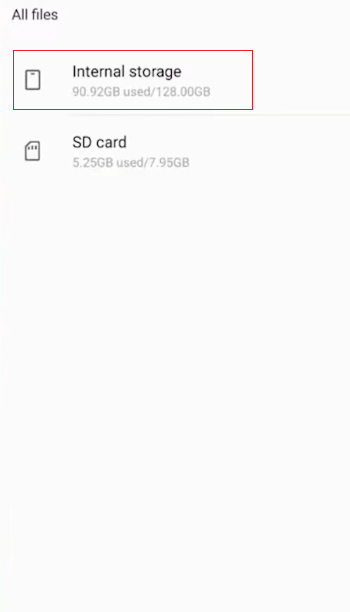
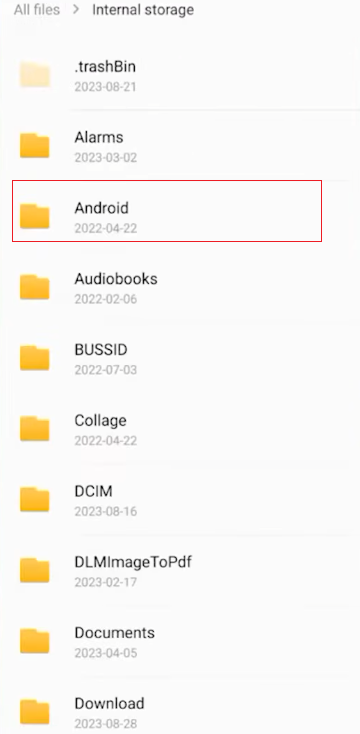
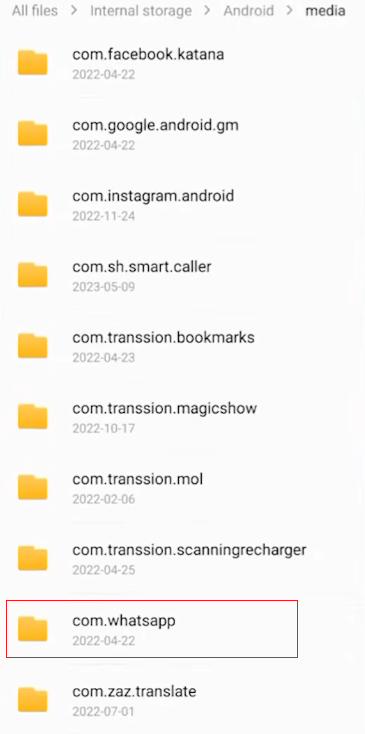
You can check your phone using a file manager:
- Open your file manager.
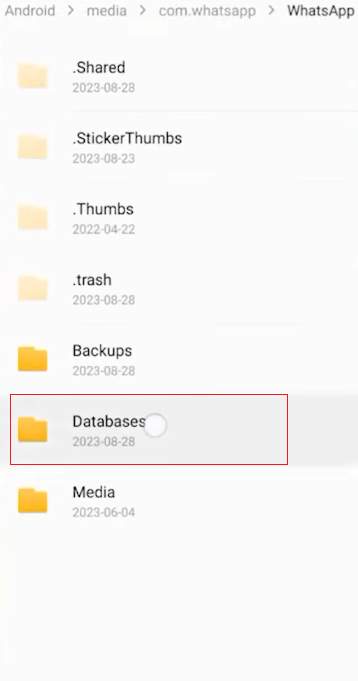
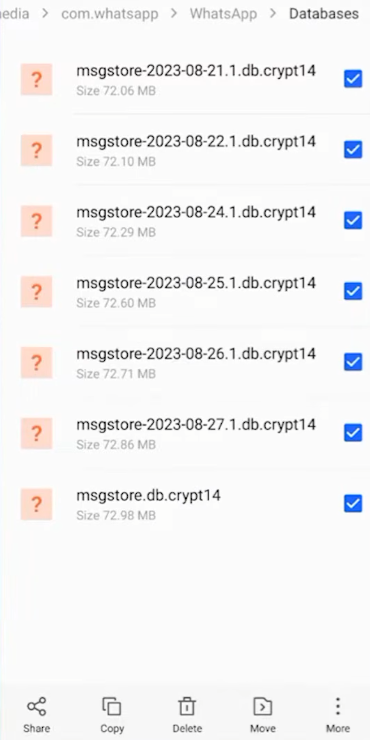
- Go to Android > Media > com.whatsapp > WhatsApp.
- Look for folders such as Databases or Media.
Even if you do not have a cloud backup, some local files may still be available. Depending on when the messages were deleted, these files may contain chat information created before the deletion.
Method 3: Review Notification History
If the deleted message created a notification before it disappeared, Android notification history may still contain part of the message.
To check:
- Open Settings.
- Go to Notifications.
- Open Notification Historyif the feature is enabled.
- Find WhatsApp notifications.
This method works best for recently received messages and can help recover text that was shown in the notification.
Method 4: Check Linked Devices
If you use WhatsApp on another device, the deleted messages may still appear there temporarily.
Examples include:
- WhatsApp Web
- Desktop version
- Another linked phone
Open the conversation on each linked device and compare the chat history. Sometimes messages remain available if the device has not refreshed recently.
Method 5: Search Exported Chat Files
Many users export chats before changing phones or cleaning storage.
Check folders such as:
- Downloads
- Documents
- Shared Files
Search for files ending with:
- .txt
- .zip
If you previously exported the conversation, you may find a complete text copy of your chat.
Method 6: Search for Shared Media
Even if chat messages are gone, shared files may still remain on your phone.
Open WhatsApp and check:
- Photos
- Videos
- Documents
- Voice messages
You can also search for media files from that contact in your phone’s photo album. These files may contain useful dates or information that can help reconstruct the content of the conversation.
Method 7: Search Your Phone
Modern phones index many files automatically.
Use your phone’s search feature to search for:
- Contact name
- Phone number
- Keywords from the conversation
- File names
Sometimes, even if the chat history itself has been deleted, documents, downloaded files, or saved pictures may still be retained.
Method 8: Check Email Copies
Some users share chats with themselves for work or personal records.
Search your email for:
- Contact name
- Keywords from the conversation
If you ever emailed the conversation, you may still have a complete record.
Method 9: Recover Information from Shared Documents
Think about whether the deleted conversation included:
- PDF files
- Word documents
- Images
- Receipts
- Voice recordings
Even if the chat history is deleted, these files will usually remain on your phone. Opening them might help you retrieve dates, addresses, account details, or other useful information from the conversation.
Tips to Improve Recovery Success
How you respond when trying to recover deleted WhatsApp messages without a backup is crucial. Subtle differences can determine whether you leave empty-handed or successfully retrieve valuable information. The following suggestions can help you perform recovery operations more effectively and systematically, especially when dealing with cases like how to recover deleted WhatsApp messages, where timing, device state, and available recovery paths all play an important role in the final outcome.
1. Act as soon as possible
The earlier you start the checkup, the better. Once new messages, files, or application updates overwrite old data, the chances of recovery decrease. While searching for lost content, it is best to temporarily stop using your phone unnecessarily.
2. Check all possible places, not just WhatsApp
Don’t rely solely on the application itself. Deleted chat history may still appear in archive folders, notification history, associated devices, or exported chat files. Checking these locations one by one can increase the chances of recovering the records.
3. Use your phone’s search function
Instead of scrolling through the search manually, use your phone’s built-in search tool. Try using contact names, keywords from conversations, or file types as search terms; this often helps you find hidden or saved items more quickly.
4. Review media separately
Even if the message is gone, photos, videos, and documents are often still preserved. Please open the photo album, file manager, and download folder to check if the shared files are still stored locally.
5. Focus on recent conversations first
Let’s start with the most active chats recently. Compared to earlier conversations, these chats are more likely to leave traces in notifications, associated devices, or temporary storage.
6. Check linked devices carefully
If you use WhatsApp on multiple devices, the chat content displayed on each device may differ slightly. Before ending the conversation, please open WhatsApp web or desktop version and carefully review your chat history.
7. Ask the other person directly
If this was a conversation between two people, the other person might still have the complete chat history. They could resend the messages, share screenshots, or export the chat log and send it to you.
8. Avoid unnecessary changes during recovery
During the search process, please try to avoid reinstalling applications, clearing storage space, or resetting settings. Keeping your phone in its current state helps preserve any remaining data traces.
Frequently Asked Questions
1. Can deleted WhatsApp messages come back without a backup?
Yes. Depending on the specific circumstances, you may still be able to find these messages through local files, notification history, associated devices, exported chat logs, or copies shared by the other party.
2. Can I recover deleted photos from WhatsApp?
Yes. Even if you delete chat history, photos and videos are usually still stored in your phone’s storage. Please check your photo album and WhatsApp media folder.
3. Are archived chats the same as deleted chats?
No. Archived chats are simply hidden from the main chat list and can be restored at any time; deleted chats are removed from the conversation list.
4. Can exported chats help recover conversations?
Yes. If you previously exported a chat, the text file may contain most or all of the conversation up to the export date.
Conclusion
In many cases, it is possible to recover deleted WhatsApp messages even without a backup, and understanding how to read deleted messages on WhatsApp can be useful in this process. While no method can guarantee success every time, checking archived chat logs, local files, notification history, linked devices, exported conversations, and saved media files may help you recover valuable information.
The best approach is to try different recovery methods one by one. Even if you can’t completely restore the original chat history, you may still be able to recover important messages, photos, documents, or conversations, preventing this information from being completely lost.